We want to encourage as many people as possible at St Andrew’s to engage with My ChurchSuite and its many benefits. To find out more please consult the FAQ below or watch the videos. Detailed information can always be found by consulting the My ChurchSuite user guide. This is very comprehensive, but be aware that it mentions some options that we are not currently using.
Before you can login to My ChurchSuite, you must first have received an invitation from the church office.
If you have already received an invitation and set your password you can login to My ChurchSuite.
login to My ChurchSuite
If you have not received an invitation, or cannot find it, please contact the Church Office or phone them on 01372 842071.
contact the Church Office
Frequently Asked Questions
what is my churchsuite?
My ChurchSuite is your personal window onto life at St Andrew’s giving you easy access to contact details for your church family, key information on upcoming events, as well as dates & times when you are next serving on a rota. You can even arrange rota swaps through My ChurchSuite. It is the best place to get this information because it is the most up-to-date and can be accessed at any time. If you have a smartphone you can even access it wherever you are. It is the information source used by your St Andrew’s admin team!
how do i get my churchsuite?
To get started, you will need to have received an invite from the Church Office. For security reasons you can’t just login without approved permission. If you would like access to My ChurchSuite and haven’t already received an invitation email, please contact the
Church Office and we will help you get setup with your account. Check your junk mail filter in case your invitation email gets filtered out.
We are sorry, but if you don’t have an email address you will not be able to use My ChurchSuite. However two people in the same family who share a single email address can still have separate My ChurchSuite accounts, distinguished by different passwords.
how do i access my churchsuite?
You can access My ChurchSuite from any computer, tablet or smartphone with internet access. If you are using a smartphone or tablet we recommend using the App. (see “
HOW DO I GET THE APP?” below)
You will need your email address and password to login. See “HOW DO I GET MY CHURCHSUITE?“.
To login to My ChurchSuite via a computer web browser
- Go to the My ChurchSuite login page
My ChurchSuite
login
- You will find it much easier in future if you create a bookmark (favourite) of this address.
- Enter your email address
- Enter the password you created on setting up your account
- Login by clicking Next
To login to the App:
- Open the App
- You may be asked to use a PIN code or use fingerprint or facial recognition to access the App.
- Begin to type standrewsoxshott in the ‘Church’ field
- Select St Andrew’s Oxshott from the prompt menu (it will remember this for subsequent logins)
- Enter your email address and the password you created on setting up your account
- Click Login
how do i get the app?
The ChurchSuite App is available to download for free, get the:
You may be asked to create a PIN code and use fingerprint or facial recognition to access the ChurchSuite App. This is to keep the security of others’ data safe.
For more details see the User Guide.
help! i’ve forgotten my password
Just click on the “Forgotten password” link on the login screen, enter your email address, and you will be sent an email containing a link which you can use to reset your password.
how can i update my details?
If you are using the App, click
Menu at the top right of the screen and choose
My Details from the list. If you are using a web browser, choose
My Details from the menu displayed on the left.
My details allows you to update your details and preferences. Press ‘Edit’ to edit any section:
- Details is where you enter your name etc. Only those sections marked * are required, but the others are helpful if you are happy to provide them. You can control which, if any, are visible to other My ChurchSuite users in the “Privacy” section.
- Image allows you to upload a photo of yourself. This is helpful to allow others to recognise you
- Spouse / Partner here you can link yourself to your spouse or partner
- Communication allows you to enter your email address, phone numbers and address. It also allows you to express your preferences for how we communicate with you. General emails are those we send out periodically advising you of important events and information. Rota reminders controls whether or not you will receive reminders when you are serving on a rota the following Sunday. You can, if you prefer, receive messages and reminders by SMS (text), but please bear in mind that we are charged for this service.
- Privacy allows you to change which, if any, of your contact details are visible to other St Andrew’s My ChurchSuite users. You should allow at least one of these options if you want others to be able to contact you to arrange rota swaps etc.
- Additional information allows you to choose the topics on which you wish to receive email updates
- Login allows you to change your password.
how can i update my email address?
Go to the
communication section under
My Details as described above and enter your new email address, not forgetting to press
Save.
Remember that once it has been changed you will need to use your new email address to login to My ChurchSuite, but your password will be unchanged unless you also change it under Login.
don’t be invisible!
When first logging in to My ChurchSuite, you may see the following message on the
Home page alerting you that
none of your basic contact details, including your name, are visible to others in My ChurchSuite.
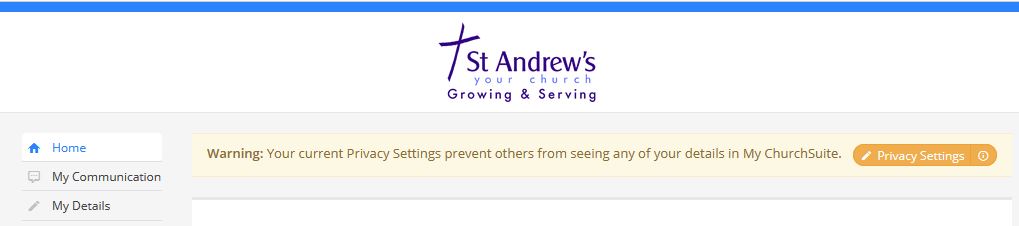
Being invisible in My ChurchSuite means that…
- Your name will not show on any rotas that you serve on or the underlying ministry’s member list – fellow rota members and ministry overseers will not see your name on the rota, and will not be able to contact you.
- Your name will not show on any small group and life group member lists that you are a member of – fellow group members and leaders will not see your name in the group’s member list, and will not be able to contact you.
- You will not be able to use the Group Email functionality in the My Rotas and My Groups sections – you won’t be able to send group emails or be able to receive group emails, meaning you could miss out on important communications.
We encourage you to review your Privacy Settings and set your name and at least one means of contact to be visible so that your community can function well. Do speak to the Church Office if you have any questions about our privacy policy that are unclear. You can be reassured that your name and any other basic contact details that you do choose to set visible to others…
- will only be visible to other members who, like you, have been authorised and invited to use My ChurchSuite,
- that you can manage your privacy settings in My ChurchSuite at any time in the future,
- that the only basic personal information that you can choose to share is your Name, Email, Mobile, Telephone and Address – no other personal information is shared (though it may be visible to you),
- that while parents can manage the personal information of each of their own children, children details are not visible to others in My ChurchSuite unless a child is a member of a rota or small group, in which case their name only is visible to fellow rota members or fellow group members – no further child details are ever disclosed in My ChurchSuite,
- that My ChurchSuite is secure.
how do i manage my rotas?
You must be logged in to My ChurchSuite to manage your rotas. See “
HOW DO I LOGIN?“.
My Rotas
You can access this area from the “My Rotas” section on the menu.
At the top of the My Rotas page you will see the “Next Serving” section, detailing your upcoming serving. Clicking on the date will give you the full details of that service, including your particular role and who else is serving with you.
Dates shown in red strike-through relate to unavailability that you’ve scheduled and that you have not yet arranged a swap for. When you add unavailability (see below), you might see entries in your ‘next serving’ section turn red.
Unavailability
Another tab takes you to the “Unavailability” section. Adding your unavailability well in advance will greatly help ministry leaders to manage rotas more effectively, enabling them to more efficiently plan ahead and identify gaps ahead of time.
This section shows a list of dates when you have said you are unavailable, perhaps holidays or known dates when you won’t be available to serve.
To add your unavailability, click on the + Add unavailability button
You can edit unavailability once it has been added, by clicking on the … within each date and choosing “edit” or “delete”.
You can also add or edit unavailabily for your spouse / partner at the same time without them having to log in seperately.
Rotas
By clicking on the Rotas tab you will see a list of all the rotas that you may be involved in. Click on the rota name to see all the details.
Rota Swaps
To arrange a rota swap, look at future dates for your rota to see someone who might be prepared to swap with you, and contact them using the contact details listed for them when the rota was originally emailed to you, or by clicking on the “teams” tab within the rota. Alternatively you can always look up their details in the “Search for others” section of My ChurchSuite.
If no contact details are shown it means that they have not given permission for them to be visible. It is therefore very important that, if you are willing, you make your contact details visible so that others can arrange swaps with you. You can easily do this by going to the “My Details” section and choosing the “Privacy” tab.
You can also use the “Email members” button, at the top right of the rota view, to send an email to everyone on the rota.
Once you have agreed a swap you can then process the swap to the rota by clicking the … against your name and choosing Organise swap. (It is important that you do this so that everyone knows about the change.)
The Organise swap pop-up opens to select who you have organised to Swap with – only available rota members will be listed. The Return swap menu will show a list of that person’s future serving dates for all rotas.
Click Save Changes to process the swap, which will update the rota and send the swap confirmations. A swap that causes a clash will be detected and the swap prevented. Typically, swap clashes are caused when swapping with someone who is unavailable or who is already serving on another rota for the same date/time. In this case you will have to contact the office to sort it out.
For more information, please see the User Guide.
Accept/decline
For some rotas you may be asked to accept or decline an invitation to serve. You can do this either by responding to the email or at any time in My ChurchSuite. Please ensure that you respond promptly so that we can be confident that you will be able to serve.
For more details please see the User Guide.
Sign Up
For some rotas you may be able to sign up for future dates yourself. Just press +Sign Up where it is shown.
All Rotas
Clicking on “All Rotas” shows an overview of all serving teams for the forthcoming Sunday. You can change the date at the top of this page to see “All Rotas” for an alternative date.
can i see my rota dates in my personal diary?
Yes! Just follow
these instructions.
what else can i do?
- My communication shows you any messages you have sent or received via ChurchSuite
- My details allows you to update your details and communication preferences
- My children will only be shown if you have a child registered in ChurchSuite. It allows you to update their details and add your other children. You can rest assured that your children’s details will never be visible by anyone else using My ChurchSuite.
- My events shows you upcoming events in the church calendar and you can also see events that you have signed up to attend and those that you have been invited to.
- My groups shows any small groups or life groups of which you are a member, together with the contact details of the other members (that they have made visible) and allows you to send an email to all members of the group. Group leaders can add new members and perform other administrative functions.
- My rotas allows you to manage your rotas (see “HOW DO I MANAGE MY ROTAS?“ above)
- Sermons podcast allows you to play the latest sermon recordings
- Search for others allows you to find contact details of other church members (where they have made their details visible)
- Links click to reveal the items below-
- Electoral Roll member confirms that you are a member of the Electoral Roll. If you are not currently on the electoral roll it will show Join the Electoral Roll
- My ChurchSuite FAQ takes you directly to this page
- St Andrew’s website takes you to the church website
- St Andrew’s Facebook takes you to the church Facebook page
- Weekly News shows the current Weekly News sheet
- Safeguarding takes you to straight to the safeguarding information on the website
how secure is my data?
Very! All the data is encrypted and kept on secure servers. Only the church staff and yourself have access to it, unless you specifically allow some contact details to be shared with other church members who have a My ChurchSuite login. Children’s data is never shared. If you are not satisfied, then take look at this more in depth
explanation.
how is my privacy protected?
Firstly, we care about people’s privacy and data security. We take our responsibilities under the General Data Protection Regulations seriously. For details see our
Data Privacy notices.
Secondly, only people in St Andrew’s who have been invited can log into My ChurchSuite
Thirdly, you have control through My ChurchSuite over who in your church family can see what. You have the option to not show your address, email, landline and mobile number. However, given that a key aim of My ChurchSuite is to help the church family connect with each other, we encourage all My ChurchSuite users to make their settings as open as they are comfortable with.
i'm new to the church — how do i register / add my details?
If you’re new to St Andrew’s and are keen to connect yourself into our church family, then we’d love for you to
add your details via the button below, and we’ll be in touch about your next steps on how to get My ChurchSuite. Alternatively, you can
download and print a paper version which can be dropped into the church office.
Add my details
how do i cancel my account?
If you wish to have your personal details removed from the church database – maybe you have left the church or moved on – please contact the
church office.i still have more questions — how do i find out more?
Just contact the
church office and we will give you all the help you need.
Or you could try looking at the My ChurchSuite user guide. This is very comprehensive, but be aware that it mentions some options that we are not currently using.
Videos
We hope this series of short videos will help you understand ‘What’, ‘Why’ and ‘How’. Please click on the videos to learn more.
ChurchSuite have recently changed how some of the My ChurchSuite pages are presented. The pages shown in the following videos may therefore look slightly different to what you will see ‘live’ in My ChurchSuite. However, the information in each video still applies. If you have any difficulties, please contact Claire or Rowena in the Church Office.
Or for an overview of all you can do in MyChurchsuite see this video…

 Thy Kingdom Come (TKC) is a global ecumenical prayer movement that invites Christians around the world to pray from Ascension to Pentecost for more people to come to know Jesus.